





Nessuna recensione corrisponde alla tua ricerca.
Nessuna domanda pubblicata per questo prodotto.
Non trovi la risposta alla tua domanda?
Nessuna recensione corrisponde alla tua ricerca.
Nessuna domanda pubblicata per questo prodotto.
Non trovi la risposta alla tua domanda?
Nessuna recensione corrisponde alla tua ricerca.
Nessuna domanda pubblicata per questo prodotto.
Non trovi la risposta alla tua domanda?
Nessuna recensione corrisponde alla tua ricerca.
Nessuna domanda pubblicata per questo prodotto.
Non trovi la risposta alla tua domanda?
Nessuna recensione corrisponde alla tua ricerca.
Nessuna domanda pubblicata per questo prodotto.
Non trovi la risposta alla tua domanda?
Nessuna recensione corrisponde alla tua ricerca.
Nessuna domanda pubblicata per questo prodotto.
Non trovi la risposta alla tua domanda?
Nessuna recensione corrisponde alla tua ricerca.
Nessuna domanda pubblicata per questo prodotto.
Non trovi la risposta alla tua domanda?
Nessuna recensione corrisponde alla tua ricerca.
Nessuna domanda pubblicata per questo prodotto.
Non trovi la risposta alla tua domanda?
Nessuna recensione corrisponde alla tua ricerca.
Nessuna domanda pubblicata per questo prodotto.
Non trovi la risposta alla tua domanda?
Nessuna recensione corrisponde alla tua ricerca.
Nessuna domanda pubblicata per questo prodotto.
Non trovi la risposta alla tua domanda?
Nessuna recensione corrisponde alla tua ricerca.
Nessuna domanda pubblicata per questo prodotto.
Non trovi la risposta alla tua domanda?
Nessuna recensione corrisponde alla tua ricerca.
Nessuna domanda pubblicata per questo prodotto.
Non trovi la risposta alla tua domanda?
Nessuna recensione corrisponde alla tua ricerca.
Nessuna domanda pubblicata per questo prodotto.
Non trovi la risposta alla tua domanda?
Nessuna recensione corrisponde alla tua ricerca.
Nessuna domanda pubblicata per questo prodotto.
Non trovi la risposta alla tua domanda?
Nessuna recensione corrisponde alla tua ricerca.
Nessuna domanda pubblicata per questo prodotto.
Non trovi la risposta alla tua domanda?
Nessuna recensione corrisponde alla tua ricerca.
Nessuna domanda pubblicata per questo prodotto.
Non trovi la risposta alla tua domanda?
Nessuna recensione corrisponde alla tua ricerca.
Nessuna domanda pubblicata per questo prodotto.
Non trovi la risposta alla tua domanda?
Nessuna recensione corrisponde alla tua ricerca.
Nessuna domanda pubblicata per questo prodotto.
Non trovi la risposta alla tua domanda?
Nessuna recensione corrisponde alla tua ricerca.
Nessuna domanda pubblicata per questo prodotto.
Non trovi la risposta alla tua domanda?
Nessuna recensione corrisponde alla tua ricerca.
Nessuna domanda pubblicata per questo prodotto.
Non trovi la risposta alla tua domanda?
Nessuna recensione corrisponde alla tua ricerca.
Nessuna domanda pubblicata per questo prodotto.
Non trovi la risposta alla tua domanda?
Nessuna recensione corrisponde alla tua ricerca.
Nessuna domanda pubblicata per questo prodotto.
Non trovi la risposta alla tua domanda?
Nessuna recensione corrisponde alla tua ricerca.
Nessuna domanda pubblicata per questo prodotto.
Non trovi la risposta alla tua domanda?
Nessuna recensione corrisponde alla tua ricerca.
Nessuna domanda pubblicata per questo prodotto.
Non trovi la risposta alla tua domanda?
Nessuna recensione corrisponde alla tua ricerca.
Nessuna domanda pubblicata per questo prodotto.
Non trovi la risposta alla tua domanda?
Nessuna recensione corrisponde alla tua ricerca.
Nessuna domanda pubblicata per questo prodotto.
Non trovi la risposta alla tua domanda?
Nessuna recensione corrisponde alla tua ricerca.
Nessuna domanda pubblicata per questo prodotto.
Non trovi la risposta alla tua domanda?
Nessuna recensione corrisponde alla tua ricerca.
Nessuna domanda pubblicata per questo prodotto.
Non trovi la risposta alla tua domanda?

Nessuna recensione corrisponde alla tua ricerca.
Nessuna domanda pubblicata per questo prodotto.
Non trovi la risposta alla tua domanda?
Nessuna recensione corrisponde alla tua ricerca.
Nessuna domanda pubblicata per questo prodotto.
Non trovi la risposta alla tua domanda?
Nessuna recensione corrisponde alla tua ricerca.
Nessuna domanda pubblicata per questo prodotto.
Non trovi la risposta alla tua domanda?
Nessuna recensione corrisponde alla tua ricerca.
Nessuna domanda pubblicata per questo prodotto.
Non trovi la risposta alla tua domanda?
Nessuna recensione corrisponde alla tua ricerca.
Nessuna domanda pubblicata per questo prodotto.
Non trovi la risposta alla tua domanda?
Nessuna recensione corrisponde alla tua ricerca.
Nessuna domanda pubblicata per questo prodotto.
Non trovi la risposta alla tua domanda?
Nessuna recensione corrisponde alla tua ricerca.
Nessuna domanda pubblicata per questo prodotto.
Non trovi la risposta alla tua domanda?
Nessuna recensione corrisponde alla tua ricerca.
Nessuna domanda pubblicata per questo prodotto.
Non trovi la risposta alla tua domanda?
Nessuna recensione corrisponde alla tua ricerca.
Nessuna domanda pubblicata per questo prodotto.
Non trovi la risposta alla tua domanda?
Nessuna recensione corrisponde alla tua ricerca.
Nessuna domanda pubblicata per questo prodotto.
Non trovi la risposta alla tua domanda?
Nessuna recensione corrisponde alla tua ricerca.
Nessuna domanda pubblicata per questo prodotto.
Non trovi la risposta alla tua domanda?
Nessuna recensione corrisponde alla tua ricerca.
Nessuna domanda pubblicata per questo prodotto.
Non trovi la risposta alla tua domanda?
Nessuna recensione corrisponde alla tua ricerca.
Nessuna domanda pubblicata per questo prodotto.
Non trovi la risposta alla tua domanda?
Nessuna recensione corrisponde alla tua ricerca.
Nessuna domanda pubblicata per questo prodotto.
Non trovi la risposta alla tua domanda?
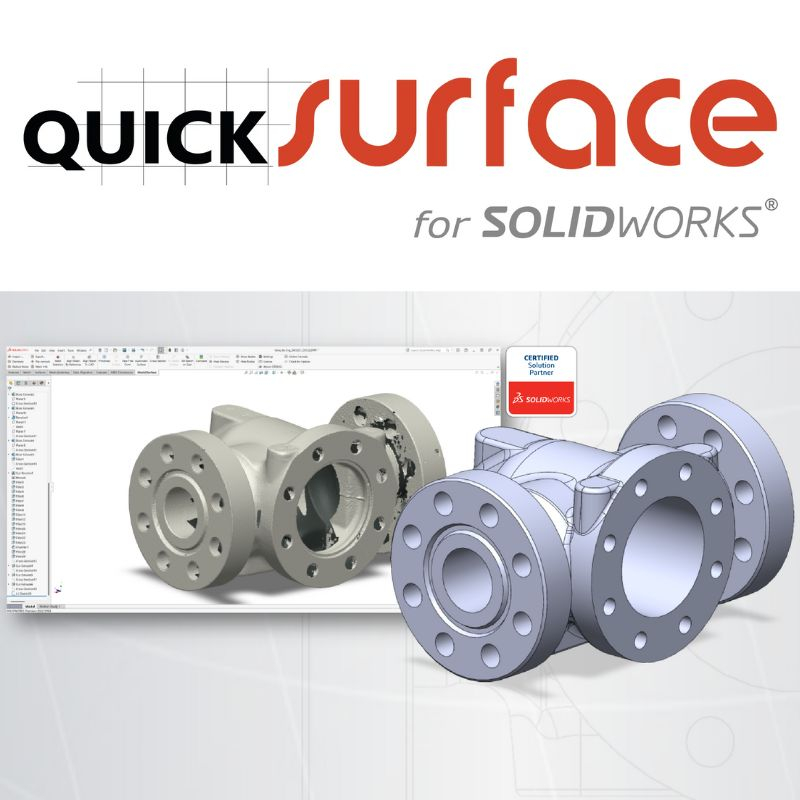
QuickSurface for SolidWorks is an add-on reverse-engineering solution designed for professionals who need to convert 3D scans into clean, accurate CAD models inside SolidWorks. It includes sketching tools, alignment features, surfacing functions and deviation control.
 Our experts are at your service to answer your questions and provide advice at info@polyfab3d.com.
Delivery within 48/72 hours
Order before 1pm. Same day shipping
Free delivery
Free delivery near you from €69.90
Premium support
Our teams are on hand to answer all your questions
Over 3500 products
A wide choice of products from the biggest brands
Designed for engineers, designers, and reverse engineering specialists, QuickSurface for SolidWorks provides a dedicated environment within SolidWorks for processing 3D scan data. Its geometric and surfacing reconstruction tools allow transforming a scanned mesh into a clean, parametric, and immediately usable CAD model.
Its strength lies as much in reconstruction accuracy as in the flexibility to work with complex data, often difficult to handle natively in SolidWorks. For teams needing to restore, modify, or reproduce physical parts, QuickSurface becomes a key component of a reliable reverse-engineering workflow.
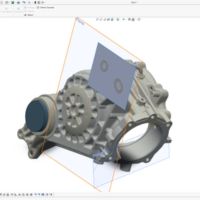
QuickSurface automatically extracts planes, cylinders, axes, spheres, and symmetries directly from the mesh. These best-fit primitives form the foundation of the CAD model, ensuring reliable, coherent geometry perfectly aligned with the scanned data.
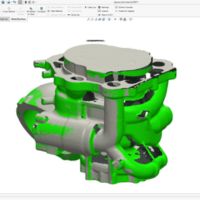
The alignment module positions the scanned part in a clean coordinate system. It facilitates merging multiple scans, referencing orientation, and fitting the mesh to an existing model. The result is a properly placed mesh ready for CAD reconstruction.
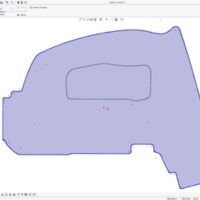
From sections extracted from the mesh, QuickSurface generates clean 2D contours: lines, arcs, and precise profiles. Correction and adjustment tools ensure parametric sketches suitable for quickly reconstructing solid geometry in SolidWorks.
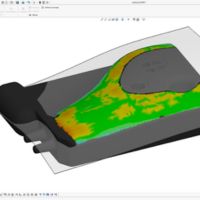
For complex areas, 3D sketching extracts edges, master curves, and guides directly from the mesh. Best-fit surfaces closely follow the scan while maintaining clean CAD-compatible topology, essential for further modifications.
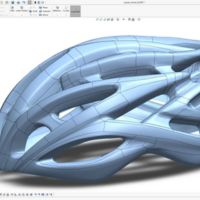
QuickSurface also excels in reconstructing freeform shapes. Its surfacing tools allow reproducing organic, irregular, or plastic volumes with precise patch control. These surfaces can be exported directly into SolidWorks without any alteration.
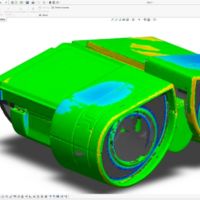
Once the model is reconstructed, a deviation analysis compares each point of the original mesh to the CAD model. The color map highlights discrepancies, allowing verification of the reverse engineering fidelity. An essential tool for quality and production requirements.
Premium Support and After-Sales Service: Starting from your needs, we will guide you to the most suitable solution and provide long-term support for its implementation and daily use.
Official Reseller: Polyfab3D is a certified reseller of top brands, ensuring you get official products, exclusive access to the latest innovations, and priority technical support.
Fast Delivery and Customer Satisfaction: Polyfab3D is committed to providing you with an optimal and fast experience. Positive feedback from our customers rewards us and proves the reliability and efficiency of our service.
A question? Need help? Contact us, it's a pleasure to help you.
Our team is available from Monday to Friday, from 10 am to 12 pm and from 2 pm to 5 pm.
Specifications for QuickSurface for SolidWorks
Technology / Product
Software
Aucun avis ne correspond à votre recherche.
Aucune question publiée pour ce produit.
Vous ne trouvez pas la réponse à votre question ?
Save products to your wishlist to buy them later or share them with friends.