



Nickel, filament de qualité.
Super
Parfait
Parfait
Très satisfait de ce PLA pour mes impressions avec ma P1S.
conforme à la commande
Aucun avis ne correspond à votre recherche.
Aucune question publiée pour ce produit.
Vous ne trouvez pas la réponse à votre question ?
Nickel, filament de qualité.
Super
Parfait
Parfait
Très satisfait de ce PLA pour mes impressions avec ma P1S.
conforme à la commande
Aucun avis ne correspond à votre recherche.
Aucune question publiée pour ce produit.
Vous ne trouvez pas la réponse à votre question ?
Nickel, filament de qualité.
Super
Parfait
Parfait
Très satisfait de ce PLA pour mes impressions avec ma P1S.
conforme à la commande
Aucun avis ne correspond à votre recherche.
Aucune question publiée pour ce produit.
Vous ne trouvez pas la réponse à votre question ?
Nickel, filament de qualité.
Super
Parfait
Parfait
Très satisfait de ce PLA pour mes impressions avec ma P1S.
conforme à la commande
Aucun avis ne correspond à votre recherche.
Aucune question publiée pour ce produit.
Vous ne trouvez pas la réponse à votre question ?
Nickel, filament de qualité.
Super
Parfait
Parfait
Très satisfait de ce PLA pour mes impressions avec ma P1S.
conforme à la commande
Aucun avis ne correspond à votre recherche.
Aucune question publiée pour ce produit.
Vous ne trouvez pas la réponse à votre question ?
Nickel, filament de qualité.
Super
Parfait
Parfait
Très satisfait de ce PLA pour mes impressions avec ma P1S.
conforme à la commande
Aucun avis ne correspond à votre recherche.
Aucune question publiée pour ce produit.
Vous ne trouvez pas la réponse à votre question ?
Nickel, filament de qualité.
Super
Parfait
Parfait
Très satisfait de ce PLA pour mes impressions avec ma P1S.
conforme à la commande
Aucun avis ne correspond à votre recherche.
Aucune question publiée pour ce produit.
Vous ne trouvez pas la réponse à votre question ?
Nickel, filament de qualité.
Super
Parfait
Parfait
Très satisfait de ce PLA pour mes impressions avec ma P1S.
conforme à la commande
Aucun avis ne correspond à votre recherche.
Aucune question publiée pour ce produit.
Vous ne trouvez pas la réponse à votre question ?
Nickel, filament de qualité.
Super
Parfait
Parfait
Très satisfait de ce PLA pour mes impressions avec ma P1S.
conforme à la commande
Aucun avis ne correspond à votre recherche.
Aucune question publiée pour ce produit.
Vous ne trouvez pas la réponse à votre question ?
Nickel, filament de qualité.
Super
Parfait
Parfait
Très satisfait de ce PLA pour mes impressions avec ma P1S.
conforme à la commande
Aucun avis ne correspond à votre recherche.
Aucune question publiée pour ce produit.
Vous ne trouvez pas la réponse à votre question ?
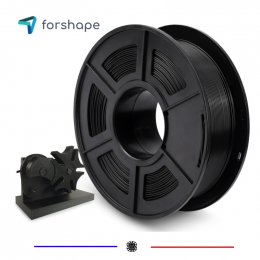
Nickel, filament de qualité.
Super
Parfait
Parfait
Très satisfait de ce PLA pour mes impressions avec ma P1S.
conforme à la commande
Aucun avis ne correspond à votre recherche.
Aucune question publiée pour ce produit.
Vous ne trouvez pas la réponse à votre question ?
Nickel, filament de qualité.
Super
Parfait
Parfait
Très satisfait de ce PLA pour mes impressions avec ma P1S.
conforme à la commande
Aucun avis ne correspond à votre recherche.
Aucune question publiée pour ce produit.
Vous ne trouvez pas la réponse à votre question ?
Nickel, filament de qualité.
Super
Parfait
Parfait
Très satisfait de ce PLA pour mes impressions avec ma P1S.
conforme à la commande
Aucun avis ne correspond à votre recherche.
Aucune question publiée pour ce produit.
Vous ne trouvez pas la réponse à votre question ?
Nickel, filament de qualité.
Super
Parfait
Parfait
Très satisfait de ce PLA pour mes impressions avec ma P1S.
conforme à la commande
Aucun avis ne correspond à votre recherche.
Aucune question publiée pour ce produit.
Vous ne trouvez pas la réponse à votre question ?
Nickel, filament de qualité.
Super
Parfait
Parfait
Très satisfait de ce PLA pour mes impressions avec ma P1S.
conforme à la commande
Aucun avis ne correspond à votre recherche.
Aucune question publiée pour ce produit.
Vous ne trouvez pas la réponse à votre question ?
Nickel, filament de qualité.
Super
Parfait
Parfait
Très satisfait de ce PLA pour mes impressions avec ma P1S.
conforme à la commande
Aucun avis ne correspond à votre recherche.
Aucune question publiée pour ce produit.
Vous ne trouvez pas la réponse à votre question ?
Nickel, filament de qualité.
Super
Parfait
Parfait
Très satisfait de ce PLA pour mes impressions avec ma P1S.
conforme à la commande
Aucun avis ne correspond à votre recherche.
Aucune question publiée pour ce produit.
Vous ne trouvez pas la réponse à votre question ?
Nickel, filament de qualité.
Super
Parfait
Parfait
Très satisfait de ce PLA pour mes impressions avec ma P1S.
conforme à la commande
Aucun avis ne correspond à votre recherche.
Aucune question publiée pour ce produit.
Vous ne trouvez pas la réponse à votre question ?
Nickel, filament de qualité.
Super
Parfait
Parfait
Très satisfait de ce PLA pour mes impressions avec ma P1S.
conforme à la commande
Aucun avis ne correspond à votre recherche.
Aucune question publiée pour ce produit.
Vous ne trouvez pas la réponse à votre question ?
Nickel, filament de qualité.
Super
Parfait
Parfait
Très satisfait de ce PLA pour mes impressions avec ma P1S.
conforme à la commande
Aucun avis ne correspond à votre recherche.
Aucune question publiée pour ce produit.
Vous ne trouvez pas la réponse à votre question ?
Nickel, filament de qualité.
Super
Parfait
Parfait
Très satisfait de ce PLA pour mes impressions avec ma P1S.
conforme à la commande
Aucun avis ne correspond à votre recherche.
Aucune question publiée pour ce produit.
Vous ne trouvez pas la réponse à votre question ?
Nickel, filament de qualité.
Super
Parfait
Parfait
Très satisfait de ce PLA pour mes impressions avec ma P1S.
conforme à la commande
Aucun avis ne correspond à votre recherche.
Aucune question publiée pour ce produit.
Vous ne trouvez pas la réponse à votre question ?
Nickel, filament de qualité.
Super
Parfait
Parfait
Très satisfait de ce PLA pour mes impressions avec ma P1S.
conforme à la commande
Aucun avis ne correspond à votre recherche.
Aucune question publiée pour ce produit.
Vous ne trouvez pas la réponse à votre question ?
Nickel, filament de qualité.
Super
Parfait
Parfait
Très satisfait de ce PLA pour mes impressions avec ma P1S.
conforme à la commande
Aucun avis ne correspond à votre recherche.
Aucune question publiée pour ce produit.
Vous ne trouvez pas la réponse à votre question ?
Nickel, filament de qualité.
Super
Parfait
Parfait
Très satisfait de ce PLA pour mes impressions avec ma P1S.
conforme à la commande
Aucun avis ne correspond à votre recherche.
Aucune question publiée pour ce produit.
Vous ne trouvez pas la réponse à votre question ?
Nickel, filament de qualité.
Super
Parfait
Parfait
Très satisfait de ce PLA pour mes impressions avec ma P1S.
conforme à la commande
Aucun avis ne correspond à votre recherche.
Aucune question publiée pour ce produit.
Vous ne trouvez pas la réponse à votre question ?
Nickel, filament de qualité.
Super
Parfait
Parfait
Très satisfait de ce PLA pour mes impressions avec ma P1S.
conforme à la commande
Aucun avis ne correspond à votre recherche.
Aucune question publiée pour ce produit.
Vous ne trouvez pas la réponse à votre question ?
Nickel, filament de qualité.
Super
Parfait
Parfait
Très satisfait de ce PLA pour mes impressions avec ma P1S.
conforme à la commande
Aucun avis ne correspond à votre recherche.
Aucune question publiée pour ce produit.
Vous ne trouvez pas la réponse à votre question ?
Nickel, filament de qualité.
Super
Parfait
Parfait
Très satisfait de ce PLA pour mes impressions avec ma P1S.
conforme à la commande
Aucun avis ne correspond à votre recherche.
Aucune question publiée pour ce produit.
Vous ne trouvez pas la réponse à votre question ?
Nickel, filament de qualité.
Super
Parfait
Parfait
Très satisfait de ce PLA pour mes impressions avec ma P1S.
conforme à la commande
Aucun avis ne correspond à votre recherche.
Aucune question publiée pour ce produit.
Vous ne trouvez pas la réponse à votre question ?
Nickel, filament de qualité.
Super
Parfait
Parfait
Très satisfait de ce PLA pour mes impressions avec ma P1S.
conforme à la commande
Aucun avis ne correspond à votre recherche.
Aucune question publiée pour ce produit.
Vous ne trouvez pas la réponse à votre question ?
Nickel, filament de qualité.
Super
Parfait
Parfait
Très satisfait de ce PLA pour mes impressions avec ma P1S.
conforme à la commande
Aucun avis ne correspond à votre recherche.
Aucune question publiée pour ce produit.
Vous ne trouvez pas la réponse à votre question ?
Nickel, filament de qualité.
Super
Parfait
Parfait
Très satisfait de ce PLA pour mes impressions avec ma P1S.
conforme à la commande
Aucun avis ne correspond à votre recherche.
Aucune question publiée pour ce produit.
Vous ne trouvez pas la réponse à votre question ?
Nickel, filament de qualité.
Super
Parfait
Parfait
Très satisfait de ce PLA pour mes impressions avec ma P1S.
conforme à la commande
Aucun avis ne correspond à votre recherche.
Aucune question publiée pour ce produit.
Vous ne trouvez pas la réponse à votre question ?
Nickel, filament de qualité.
Super
Parfait
Parfait
Très satisfait de ce PLA pour mes impressions avec ma P1S.
conforme à la commande
Aucun avis ne correspond à votre recherche.
Aucune question publiée pour ce produit.
Vous ne trouvez pas la réponse à votre question ?
Nickel, filament de qualité.
Super
Parfait
Parfait
Très satisfait de ce PLA pour mes impressions avec ma P1S.
conforme à la commande
Aucun avis ne correspond à votre recherche.
Aucune question publiée pour ce produit.
Vous ne trouvez pas la réponse à votre question ?
Nickel, filament de qualité.
Super
Parfait
Parfait
Très satisfait de ce PLA pour mes impressions avec ma P1S.
conforme à la commande
Aucun avis ne correspond à votre recherche.
Aucune question publiée pour ce produit.
Vous ne trouvez pas la réponse à votre question ?
Nickel, filament de qualité.
Super
Parfait
Parfait
Très satisfait de ce PLA pour mes impressions avec ma P1S.
conforme à la commande
Aucun avis ne correspond à votre recherche.
Aucune question publiée pour ce produit.
Vous ne trouvez pas la réponse à votre question ?
Nickel, filament de qualité.
Super
Parfait
Parfait
Très satisfait de ce PLA pour mes impressions avec ma P1S.
conforme à la commande
Aucun avis ne correspond à votre recherche.
Aucune question publiée pour ce produit.
Vous ne trouvez pas la réponse à votre question ?
Nickel, filament de qualité.
Super
Parfait
Parfait
Très satisfait de ce PLA pour mes impressions avec ma P1S.
conforme à la commande
Aucun avis ne correspond à votre recherche.
Aucune question publiée pour ce produit.
Vous ne trouvez pas la réponse à votre question ?
Nickel, filament de qualité.
Super
Parfait
Parfait
Très satisfait de ce PLA pour mes impressions avec ma P1S.
conforme à la commande
Aucun avis ne correspond à votre recherche.
Aucune question publiée pour ce produit.
Vous ne trouvez pas la réponse à votre question ?
Nickel, filament de qualité.
Super
Parfait
Parfait
Très satisfait de ce PLA pour mes impressions avec ma P1S.
conforme à la commande
Aucun avis ne correspond à votre recherche.
Aucune question publiée pour ce produit.
Vous ne trouvez pas la réponse à votre question ?
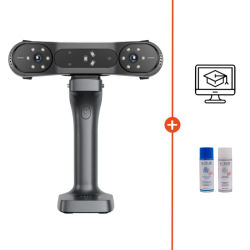
EXModel is a powerful bridge that simplifies CAD modeling, from 3D scanning to manufacturing. It offers a complete range of tools that allow you to create professional CAD digital models compatible with your CAD software.
Below is the comparison table between EXModel Personal and EXModel Pro.
 Our experts are at your service to answer your questions and provide advice at info@polyfab3d.com.
Delivery within 48/72 hours
Order before 1pm. Same day shipping
Free delivery
Free delivery near you from €69.90
Premium support
Our teams are on hand to answer all your questions
Over 3500 products
A wide choice of products from the biggest brands
EXModel is integrated into the Shining 3D scanning software. Once your object has been scanned in the scanning software, you can import it directly into EXModel with a single click. As the software is fully optimised for scan data, there is no limit to the size of the mesh you import.
Effortless mesh processing: Say goodbye to complexity. EXModel effortlessly extracts all the necessary elements, bridging the gap between 3D scan and CAD design to ensure a smooth transition from scan to design.
Improved data utilisation: Expand the horizons of 3D data applications with EXModel. Improve the customer experience by easily repairing meshes and exporting aligned and Boolean data for seamless 3D printing. This speeds up manufacturing times and ensures accuracy with every print.
Accurate CAD creation: Create high-quality CAD designs directly with EXModel's intuitive freeform and parametric modelling tools. With a user-friendly guide, you can unleash your creativity and bring your ideas to life with unrivalled precision
Cost-effective solution: Discover ultimate value with EXModel. As the most cost-effective all-in-one solution for mesh processing and reverse engineering, it lets you simplify models for simulations, edit and repair data, and transform physical parts into custom CAD designs, all while keeping costs low and productivity high.
A question? Need help? Contact us, it's a pleasure to help you.
Our team is available from Monday to Friday, from 10 am to 12 pm and from 2 pm to 5 pm.
| FEATURES | EXModel Pro | EXModel |
|---|---|---|
| MODELING & EDITING TOOLS | ||
| Mesh Editing (Fill Holes, Smoothing, Editing Boundaries) | ✓ | ✓ |
| Mesh Alignment (Coordinates / N-points / Fine Align) | ✓ | ✓ |
| Primitives Extraction / Construct References | ✓ | ✓ |
| Cross Sections / 2D Sketching / 3D Sketching | ✓ | ✓ |
| Fit / Manual Free Form Modelling / Auto Surfacing | ✓ | ✓ |
| Export Features / Profile as IGES / STEP / DXF | ✓ | ✓ |
| Extrude / Revolved Surfaces | ✓ | ✓ |
| Helix / Loft / Sweep / Fill Surface (Class A surfaces) / Blend Surface / Flatten | ✓ | ✗ |
| Constraints / Offset / Patterns / Sketch Assist in 2D Sketch | ✓ | ✗ |
| Unroll Mesh & Roll 2D Sketch | ✓ | ✗ |
| Trim to Solid / Cut / Combine / Intersect / Fillet / Chamfer / Patterns | ✓ | ✗ |
| Hybrid Modelling (Free-Form & Parametric) | ✓ | ✗ |
| Transfer Design and Feature Tree to other Packages | ✓ | ✗ |
| Compare | Mesh vs Mesh | ✗ |
Specifications for EXModel Pro
Technology / Product
Software
Aucun avis ne correspond à votre recherche.
Aucune question publiée pour ce produit.
Vous ne trouvez pas la réponse à votre question ?
Save products to your wishlist to buy them later or share them with friends.